> ## Documentation Index
> Fetch the complete documentation index at: https://docs.braintrust.ti.trilogy.com/llms.txt
> Use this file to discover all available pages before exploring further.

# Introduction

> AI experts in Google Chat, ready to help in DMs and group Spaces.

<style>
  {`
    /* ── Orb paths ──────────────────────────────────────────────── */
    @keyframes bt-orb-a {
      0%,100% { transform: translate(  0px,   0px) scale(1.00); }
      30%     { transform: translate( 60px, -50px) scale(1.08); }
      65%     { transform: translate(-35px,  40px) scale(0.93); }
    }
    @keyframes bt-orb-b {
      0%,100% { transform: translate(  0px,   0px) scale(1.00); }
      35%     { transform: translate(-55px,  45px) scale(1.12); }
      70%     { transform: translate( 40px, -30px) scale(0.90); }
    }
    @keyframes bt-orb-c {
      0%,100% { transform: translate(  0px,   0px) scale(1.00); }
      50%     { transform: translate( 30px,  50px) scale(1.07); }
    }
    @keyframes bt-orb-d {
      0%,100% { transform: translate(  0px,   0px) scale(1.00); }
      40%     { transform: translate(-25px, -40px) scale(1.15); }
      80%     { transform: translate( 45px,  20px) scale(0.87); }
    }
    /* ── Hero bg shift ──────────────────────────────────────────── */
    @keyframes bt-bg {
      0%,100% { background-position:   0% 50%; }
      50%     { background-position: 100% 50%; }
    }
    /* ── Hue cycle on orbs ──────────────────────────────────────── */
    @keyframes bt-hue {
      from { filter: hue-rotate(  0deg); }
      to   { filter: hue-rotate(360deg); }
    }
    /* ── Particles ──────────────────────────────────────────────── */
    @keyframes bt-particle {
      0%   { transform: translateY(0)      translateX(0);                   opacity: 0; }
      10%  { opacity: 1; }
      90%  { opacity: 0.7; }
      100% { transform: translateY(-290px) translateX(var(--drift, 12px));  opacity: 0; }
    }
    /* ── Hero border glow ───────────────────────────────────────── */
    @keyframes bt-glow {
      0%,100% { box-shadow: 0 0 0 1px rgba(0,122,255,.25), 0 0 55px -15px rgba(0,122,255,.30); }
      50%     { box-shadow: 0 0 0 1px rgba(0,122,255,.55), 0 0 90px  -5px rgba(0,122,255,.45); }
    }
    /* ── Title shimmer ──────────────────────────────────────────── */
    @keyframes bt-shimmer {
      0%   { background-position: -220% center; }
      100% { background-position:  220% center; }
    }
    /* ── Badge glow ─────────────────────────────────────────────── */
    @keyframes bt-badge-glow {
      0%,100% { box-shadow: 0 0  0   0 rgba(0,122,255,.30); }
      50%     { box-shadow: 0 0 14px 3px rgba(0,122,255,.15); }
    }
    /* ── Entrance ───────────────────────────────────────────────── */
    @keyframes bt-up {
      from { opacity: 0; transform: translateY(20px); }
      to   { opacity: 1; transform: translateY(0);    }
    }

    /* ── Hero wrapper ───────────────────────────────────────────── */
    .bt-hero {
      background: linear-gradient(135deg, #c7dfff, #eef4ff, #dde8ff, #f0f7ff, #d4e8ff);
      background-size: 500% 500%;
      animation: bt-bg 22s ease infinite, bt-glow 5s ease-in-out infinite;
    }
    .dark .bt-hero {
      background: linear-gradient(135deg, #001433, #0d0828, #001e20, #180028, #001433);
      background-size: 500% 500%;
      animation: bt-bg 22s ease infinite, bt-glow 5s ease-in-out infinite;
    }

    /* ── Perspective grid floor ─────────────────────────────────── */
    .bt-grid {
      position: absolute; bottom: 0; left: -40%; right: -40%; height: 52%;
      background-image:
        linear-gradient(rgba(0,122,255,.14) 1px, transparent 1px),
        linear-gradient(90deg, rgba(0,122,255,.10) 1px, transparent 1px);
      background-size: 56px 56px;
      transform: perspective(280px) rotateX(58deg);
      transform-origin: bottom center;
      mask-image: linear-gradient(to top, rgba(0,0,0,.7) 0%, transparent 100%);
      -webkit-mask-image: linear-gradient(to top, rgba(0,0,0,.7) 0%, transparent 100%);
      pointer-events: none;
    }
    :not(.dark) .bt-grid {
      background-image:
        linear-gradient(rgba(0,80,200,.07) 1px, transparent 1px),
        linear-gradient(90deg, rgba(0,80,200,.05) 1px, transparent 1px);
    }

    /* ── Particles ──────────────────────────────────────────────── */
    .bt-p {
      position: absolute; border-radius: 50%; pointer-events: none; bottom: 12%;
      background: rgba(0,80,200,.35);
      animation: bt-particle var(--dur,9s) ease-in-out infinite;
      animation-delay: var(--delay,0s);
    }
    .dark .bt-p                { background: rgba(140,200,255,.55); }
    .dark .bt-p:nth-child(odd) { background: rgba(255,255,255,.42); }
    .dark .bt-p:nth-child(4n)  { background: rgba(180,120,255,.50); }

    /* ── Title shimmer ──────────────────────────────────────────── */
    .bt-title {
      background: linear-gradient(110deg, #0a2240 20%, #1d6ffa 45%, #60a5fa 55%, #0a2240 80%);
      background-size: 220% auto;
      -webkit-background-clip: text; -webkit-text-fill-color: transparent; background-clip: text;
      animation: bt-shimmer 7s linear infinite, bt-up .55s ease-out .1s both;
    }
    .dark .bt-title {
      background: linear-gradient(110deg, #ffffff 20%, #60c0ff 45%, #a5d8ff 55%, #ffffff 80%);
      background-size: 220% auto;
      -webkit-background-clip: text; -webkit-text-fill-color: transparent; background-clip: text;
      animation: bt-shimmer 7s linear infinite, bt-up .55s ease-out .1s both;
    }

    .bt-badge { animation: bt-badge-glow 3s ease-in-out infinite, bt-up .45s ease-out both; }
    .bt-desc  { animation: bt-up .65s ease-out .2s both; }

    /* ── Reduce-motion ───────────────────────────────────────────── */
    @media (prefers-reduced-motion: reduce) {
      .bt-hero, .bt-p, .bt-title, .dark .bt-title,
      .bt-badge, .bt-desc { animation: none !important; }
      .bt-title, .dark .bt-title { -webkit-text-fill-color: unset; color: inherit; }
    }
    `}
</style>

<div className="bt-hero not-prose relative overflow-hidden rounded-2xl px-8 py-14 mb-8" style={{minHeight:'320px'}}>
  {/* Perspective grid floor */}

  <div className="bt-grid" />

  {/* Dot-grid texture */}

  <div className="pointer-events-none absolute inset-0 opacity-[0.035] dark:opacity-[0.07]" style={{backgroundImage:'radial-gradient(circle, #007AFF 1px, transparent 1px)', backgroundSize:'30px 30px'}} />

  {/* Aurora orbs */}

  <div className="pointer-events-none absolute" style={{top:'-6rem',right:'-6rem',animation:'bt-hue 28s linear infinite'}}>
    <div className="h-[26rem] w-[26rem] rounded-full bg-[#007AFF]/30 blur-3xl dark:bg-[#007AFF]/42" style={{animation:'bt-orb-a 12s ease-in-out infinite'}} />
  </div>

  <div className="pointer-events-none absolute" style={{bottom:'-5rem',left:'-5rem',animation:'bt-hue 36s linear infinite'}}>
    <div className="h-72 w-72 rounded-full bg-indigo-500/25 blur-3xl dark:bg-indigo-500/38" style={{animation:'bt-orb-b 15s ease-in-out infinite'}} />
  </div>

  <div className="pointer-events-none absolute" style={{top:'30%',right:'28%',animation:'bt-hue 20s linear infinite reverse'}}>
    <div className="h-52 w-52 rounded-full bg-violet-500/[.18] blur-2xl dark:bg-violet-500/[.30]" style={{animation:'bt-orb-c 10s ease-in-out infinite'}} />
  </div>

  <div className="pointer-events-none absolute" style={{bottom:'20%',right:'8%',animation:'bt-hue 44s linear infinite'}}>
    <div className="h-40 w-40 rounded-full bg-cyan-400/20 blur-xl dark:bg-cyan-400/32" style={{animation:'bt-orb-d 8s ease-in-out infinite'}} />
  </div>

  {/* Particles */}

  <div className="bt-p" style={{'--dur':'9s',  '--delay':'0s',   '--drift':'14px',  left:'5%',  width:'3px', height:'3px'}} />

  <div className="bt-p" style={{'--dur':'11s', '--delay':'1.8s', '--drift':'-10px', left:'13%', width:'2px', height:'2px'}} />

  <div className="bt-p" style={{'--dur':'13s', '--delay':'3.2s', '--drift':'18px',  left:'24%', width:'4px', height:'4px'}} />

  <div className="bt-p" style={{'--dur':'8s',  '--delay':'0.9s', '--drift':'-14px', left:'36%', width:'2px', height:'2px'}} />

  <div className="bt-p" style={{'--dur':'10s', '--delay':'2.4s', '--drift':'10px',  left:'50%', width:'3px', height:'3px'}} />

  <div className="bt-p" style={{'--dur':'12s', '--delay':'4.1s', '--drift':'-18px', left:'62%', width:'2px', height:'2px'}} />

  <div className="bt-p" style={{'--dur':'9s',  '--delay':'1.3s', '--drift':'12px',  left:'73%', width:'3px', height:'3px'}} />

  <div className="bt-p" style={{'--dur':'14s', '--delay':'3.7s', '--drift':'-8px',  left:'82%', width:'4px', height:'4px'}} />

  <div className="bt-p" style={{'--dur':'10s', '--delay':'0.6s', '--drift':'16px',  left:'89%', width:'2px', height:'2px'}} />

  <div className="bt-p" style={{'--dur':'11s', '--delay':'2.0s', '--drift':'-12px', left:'96%', width:'3px', height:'3px'}} />

  {/* Content */}

  <div className="relative z-10 max-w-2xl">
    <span className="bt-badge mb-5 inline-block rounded-full border border-[#007AFF]/40 bg-[#007AFF]/10 px-3 py-1 text-xs font-semibold uppercase tracking-widest text-[#007AFF]">
      AI Experts · Google Chat · All in One Place
    </span>

    <h1 className="bt-title mb-4 text-6xl font-black tracking-tight leading-none">
      Braintrust
    </h1>

    <p className="bt-desc max-w-xl text-xl leading-relaxed text-gray-700 dark:text-gray-300">
      Hire specialized AI experts that live inside Google Chat. They answer questions, run tasks, connect to your tools, and automate workflows — all without leaving the chat your team already uses.
    </p>
  </div>
</div>

## What You Get

<CardGroup cols={3}>
  <Card title="Lives in Google Chat" icon="message" color="#007AFF">
    No new apps. Experts arrive as Google Workspace accounts — ready to message the moment you hire them.
  </Card>

  <Card title="Focused on One Job" icon="wand-magic-sparkles" color="#5856D6">
    Each expert is purpose-built — research, writing, data analysis, code review. The right tool for the task, not everything at once.
  </Card>

  <Card title="Built for Teams" icon="users" color="#34C759">
    Add experts to a shared group Space. Route questions automatically using the Orchestrator so the right expert always responds.
  </Card>

  <Card title="Connects to Real Tools" icon="plug" color="#FF9500">
    Google Workspace, Notion, Supabase, and any custom API via MCP. Experts don't just talk — they act.
  </Card>

  <Card title="Runs on Your Schedule" icon="clock" color="#5856D6">
    Set recurring or one-time automations. Experts send reports, run jobs, and respond to calendar events with no manual prompting.
  </Card>

  <Card title="Invoke via API" icon="code" color="#007AFF">
    Embed expert capabilities in your own apps using the REST + SSE invocation API. One endpoint. Full streaming support.
  </Card>
</CardGroup>

## How It Works

<Steps>
  <Step title="Browse the Marketplace" icon="magnifying-glass">
    Explore pre-built experts by category — writing, research, data analysis, and more. **Verified** experts are reviewed and ready to use. Switch to **All Experts** to see community-built options too.
  </Step>

  <Step title="Hire an Expert" icon="user-plus">
    Click **Hire**. Braintrust provisions the expert with its own Google Workspace identity and opens a private DM between you and your new expert in Google Chat.
  </Step>

  <Step title="Connect Its Tools" icon="plug">
    Authorize Google Workspace, add API keys for Notion or Supabase, or attach a custom MCP server. One-time setup — then it just works.
  </Step>

  <Step title="Start Talking" icon="message">
    Message the expert like you would a coworker. It reads your request, calls its tools, and replies in real time — directly in your chat. No new interface to learn.
  </Step>

  <Step title="Scale to Your Team" icon="users">
    [Add your expert to a group Space](/experts/getting-braintrust-into-google-chat). Use `@BrainTrust` to route requests, or configure the Orchestrator to automatically pick the right expert when multiple are present.
  </Step>
</Steps>

## Three Ways to Use Braintrust

<Tabs>
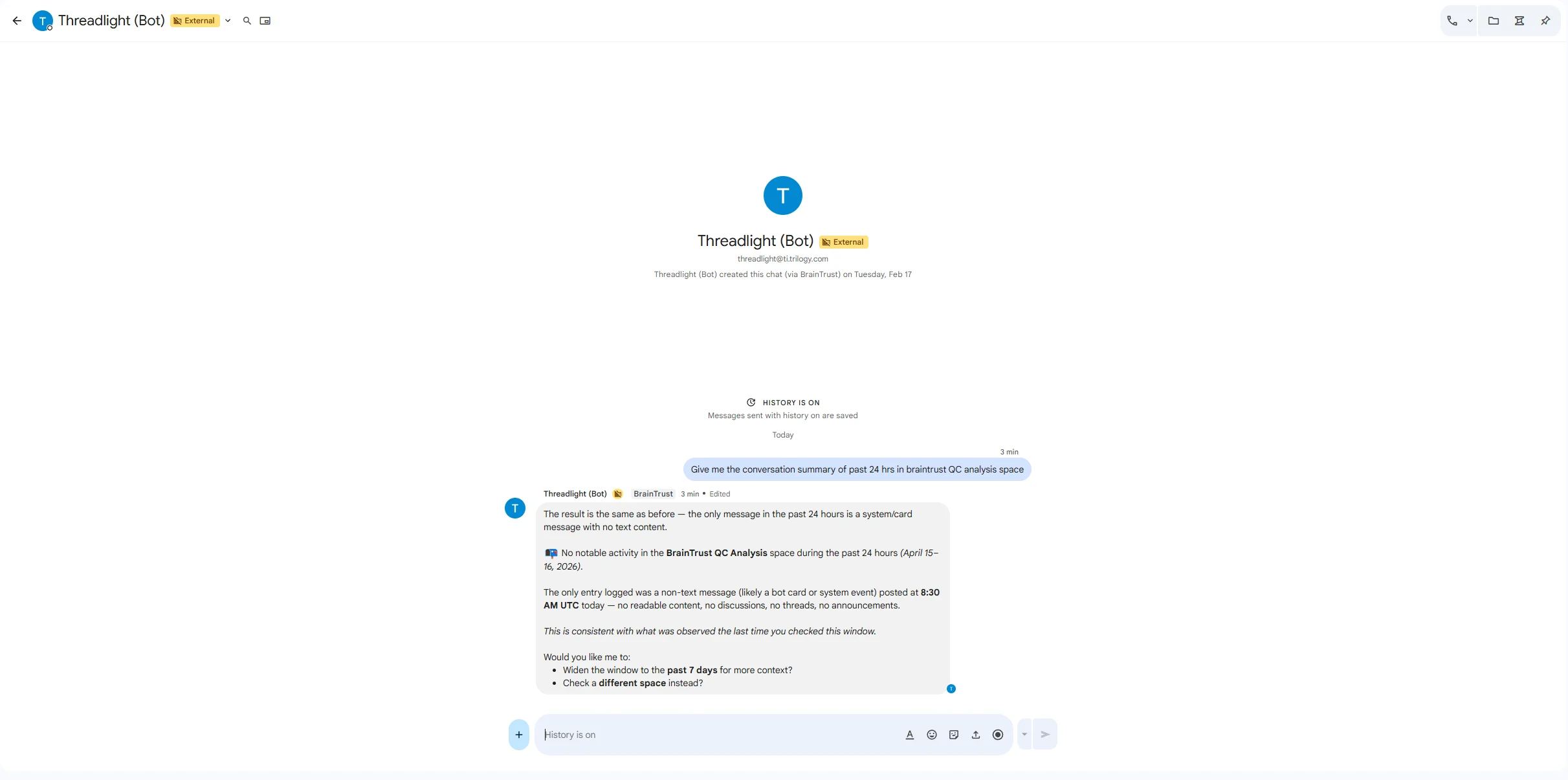
  <Tab title="DM an Expert">
    **Private, focused work.** Hire an expert and have a 1:1 conversation in your Google Chat DMs.

    * Ask questions, request documents, run analyses
    * Expert remembers context across your conversation using long-term memory
    * Perfect for personal productivity and individual tasks

    <Frame>
      <img src="https://mintcdn.com/devfactory/u5Yqu2R9CqIhWQWI/images/agent-dm-conversation.png?fit=max&auto=format&n=u5Yqu2R9CqIhWQWI&q=85&s=10b46f5754c62be0966d1587d83a0c36" alt="DM conversation with a Braintrust expert" width="2423" height="1205" data-path="images/agent-dm-conversation.png" />
    </Frame>

    [Hire your first expert →](/experts/hiring-your-first-agent)
  </Tab>

  <Tab title="Group Space">
    **Team collaboration.** Add experts to a shared Google Chat Space alongside your teammates.

    * Multiple experts can coexist in one Space
    * Use `@BrainTrust` to route requests to the right expert
    * Colleagues interact with experts without hiring them individually

    [Add experts to a Space →](/experts/getting-braintrust-into-google-chat)
  </Tab>

  <Tab title="API">
    **Programmatic access.** Call any expert from your own applications, scripts, or data pipelines.

    * REST endpoint with real-time streaming via SSE
    * Pass files, context, thread tokens for conversation continuity
    * Route to multiple experts in a single request
    * Ideal for automations, integrations, and embedding expert capabilities

    ```bash theme={null}
    curl -X POST https://your-domain.com/api/agents/invoke \
      -H "x-api-key: YOUR_API_KEY" \
      -H "Accept: text/event-stream" \
      -H "Content-Type: application/json" \
      -d '{"agent": "expert@yourdomain.com", "message": "Summarize this week'\''s data"}'
    ```

    [Read the API reference →](/reference/api-reference)
  </Tab>
</Tabs>

## Integrations

<CardGroup cols={4}>
  <Card title="Google Docs" icon="file-lines" horizontal>
    Create, read, and update documents
  </Card>

  <Card title="Google Sheets" icon="table-cells" horizontal>
    Analyze and update spreadsheet data
  </Card>

  <Card title="Google Drive" icon="hard-drive" horizontal>
    Search and organize files
  </Card>

  <Card title="Gmail" icon="envelope" horizontal>
    Draft and search emails
  </Card>

  <Card title="Google Calendar" icon="calendar-days" horizontal>
    Read schedules, create events
  </Card>

  <Card title="Notion" icon="book-bookmark" horizontal>
    Read and update pages and databases
  </Card>

  <Card title="Custom APIs" icon="puzzle-piece" horizontal>
    Connect any service via MCP server
  </Card>

  <Card title="Python Sandbox" icon="laptop-code" horizontal>
    Execute code, process files, generate charts
  </Card>
</CardGroup>

## Ready to Start?

<CardGroup cols={2}>
  <Card title="Quickstart" icon="rocket" color="#007AFF" href="/get-started/quickstart" arrow={true}>
    Get your first expert running in 5 minutes — step-by-step from marketplace to first conversation.
  </Card>

  <Card title="Hire Your First Expert" icon="user-plus" color="#5856D6" href="/experts/hiring-your-first-agent" arrow={true}>
    Browse the marketplace, pick an expert, and open your first DM.
  </Card>

  <Card title="Set Up Automations" icon="clock" color="#FF9500" href="/automation/triggers" arrow={true}>
    Schedule experts to run reports, send summaries, and act on calendar events.
  </Card>

  <Card title="API Reference" icon="code" color="#34C759" href="/reference/api-reference" arrow={true}>
    Invoke experts programmatically from your own apps and pipelines.
  </Card>
</CardGroup>
