> ## Documentation Index
> Fetch the complete documentation index at: https://docs.braintrust.ti.trilogy.com/llms.txt
> Use this file to discover all available pages before exploring further.
# Managing API Keys
> Create and manage API keys to invoke Braintrust experts programmatically.
API keys let you invoke Braintrust experts programmatically — from scripts, CI/CD pipelines, custom applications, or any HTTP client. Each key is tied to your account and carries your access permissions.
## Opening the API Keys Manager
1. Click the **settings icon** (gear icon) at the bottom-left of the sidebar, next to your name.
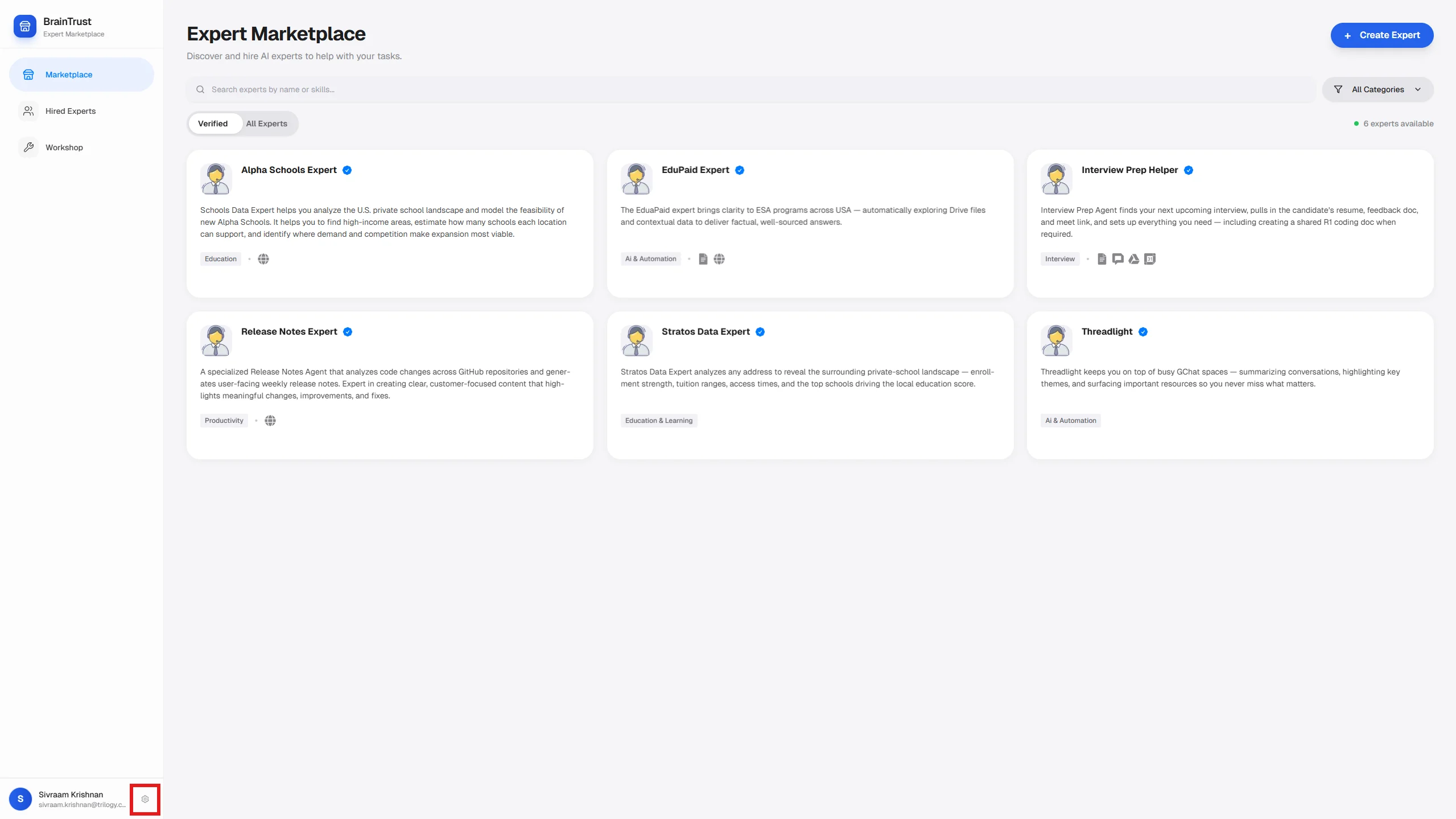 2. In the **Settings** modal, click **Manage API Keys**.
 ## Creating an API Key
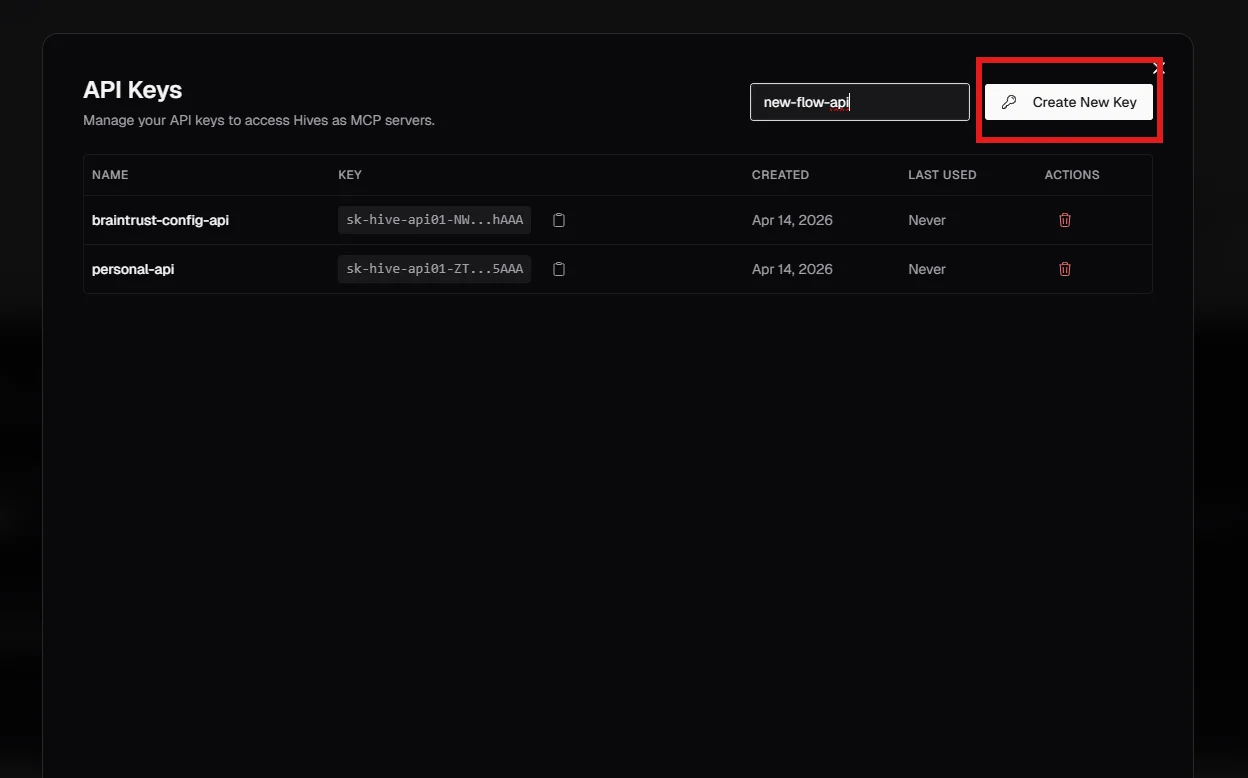
Type a descriptive name in the field (for example: `ci-pipeline`, `slack-bot`, `local-dev`). Names help you identify which key belongs to which integration.
Click the **Create New Key** button. The key is created immediately.
## Creating an API Key
Type a descriptive name in the field (for example: `ci-pipeline`, `slack-bot`, `local-dev`). Names help you identify which key belongs to which integration.
Click the **Create New Key** button. The key is created immediately.
 The full key is shown **once** — immediately after creation. Copy it and store it securely (for example, in a password manager or as an environment variable).
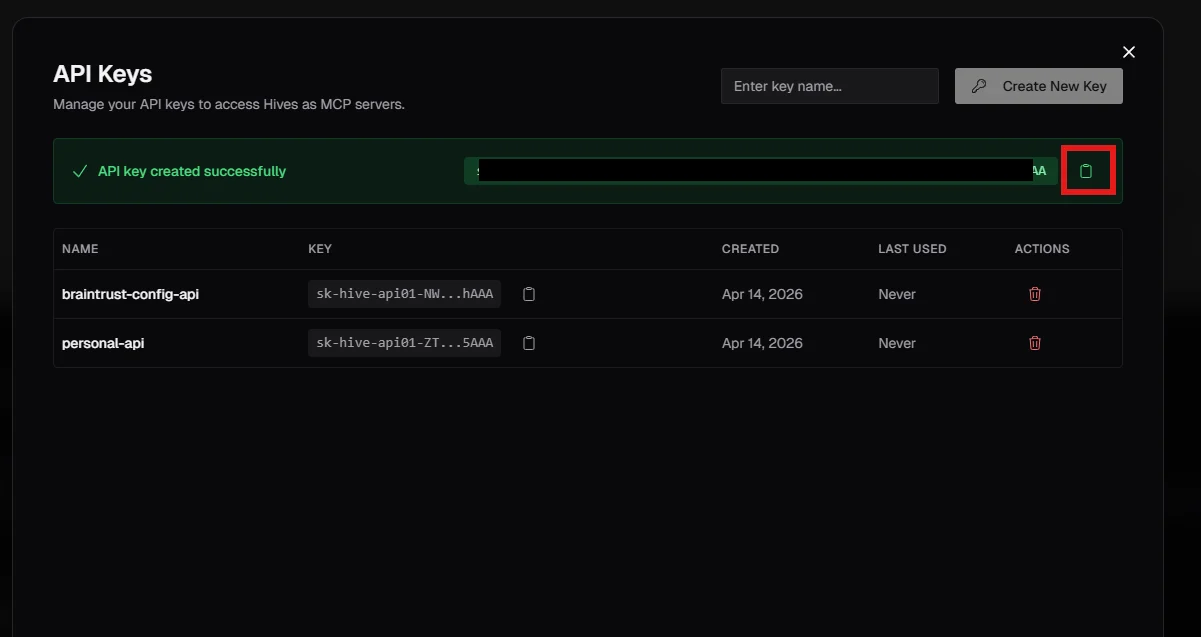 After you leave this view, the key is truncated for security. There is no way to retrieve the full value again. If you lose it, delete the key and create a new one.
**Done.** You now have an API key. Use it as the `x-api-key` header on every API request.
## Using Your API Key
Pass the key as a header on every request:
```
x-api-key: YOUR_API_KEY
```
Example:
```shell theme={null}
curl -s -N -X POST "https://braintrust.ti.trilogy.com/api/agents/invoke" \
-H "x-api-key: YOUR_API_KEY" \
-H "Content-Type: application/json" \
-d '{"agent":"AGENT_ID","message":"What can you help me with?"}'
```
See [API Reference](/reference/api-reference) for the full request format.
## Deleting a Key
Click the **trash icon** next to any key in the list to delete it permanently. Deletion is immediate — any integration using that key will stop working.
Before deleting a key used in production, rotate it: create the new key first, update all integrations, then delete the old key.
## Security Best Practices
* **Never commit API keys to source control.** Use environment variables or a secrets manager.
* **Never log keys in plain text.** Treat them like passwords.
* **Use one key per integration.** This makes it easy to revoke access for a single system without affecting others.
* **Use HTTPS only.** The API rejects plain HTTP connections.
## Next Steps
Full request format, streaming events, async mode, and error codes.
Run experts on a schedule without any code.
After you leave this view, the key is truncated for security. There is no way to retrieve the full value again. If you lose it, delete the key and create a new one.
**Done.** You now have an API key. Use it as the `x-api-key` header on every API request.
## Using Your API Key
Pass the key as a header on every request:
```
x-api-key: YOUR_API_KEY
```
Example:
```shell theme={null}
curl -s -N -X POST "https://braintrust.ti.trilogy.com/api/agents/invoke" \
-H "x-api-key: YOUR_API_KEY" \
-H "Content-Type: application/json" \
-d '{"agent":"AGENT_ID","message":"What can you help me with?"}'
```
See [API Reference](/reference/api-reference) for the full request format.
## Deleting a Key
Click the **trash icon** next to any key in the list to delete it permanently. Deletion is immediate — any integration using that key will stop working.
Before deleting a key used in production, rotate it: create the new key first, update all integrations, then delete the old key.
## Security Best Practices
* **Never commit API keys to source control.** Use environment variables or a secrets manager.
* **Never log keys in plain text.** Treat them like passwords.
* **Use one key per integration.** This makes it easy to revoke access for a single system without affecting others.
* **Use HTTPS only.** The API rejects plain HTTP connections.
## Next Steps
Full request format, streaming events, async mode, and error codes.
Run experts on a schedule without any code.